Case Study — Banner Generator
Role: Sole originator and implementer — idea, pitch, architecture, implementation, rollout.
Stack: React · TypeScript · Redux Toolkit Query · MUI · Vite · HTML5 / Google Web Designer · DV360
TL;DR
I pitched and built the Banner Generator: a wizard that turns a single Google Web Designer master template into a full, multi-size, 3D-capable HTML5 banner set and pushes it straight to DV360 — collapsing what used to be a multi-day designer + trafficker handoff into a single guided flow inside the product.
The problem
- A designer hand-built a banner in Google Web Designer, one HTML5 file per size.
- Copy or color tweaks meant re-exporting every size from GWD.
- Trafficking uploaded the HTML5 zips into DV360 by hand and linked them to line items.
- Interactive formats — especially 3D — were one-off, bespoke projects that rarely shipped at scale.
Time-to-launch was measured in days per concept, and 3D ads were effectively gated behind senior creative talent.
The pitch
Stop rebuilding banners. Treat the studio's GWD output as a template, let a marketer fill a form once, and have the platform produce every required size — including interactive 3D — and ship them to DV360 in one click.
The bet was that we didn't need a banner editor; we needed an assembly line wrapped around the tools the studio already used.
What I built
A two-step wizard
- Template Selection — a filterable grid of HTML5 templates ingested from the studio's Google Web Designer exports. Each card surfaces dimensions, supported field types (text, color, image, logo, icon, 3D model, click tag), and lets the user pick additional dimensions so one master template fans out into a full size set.
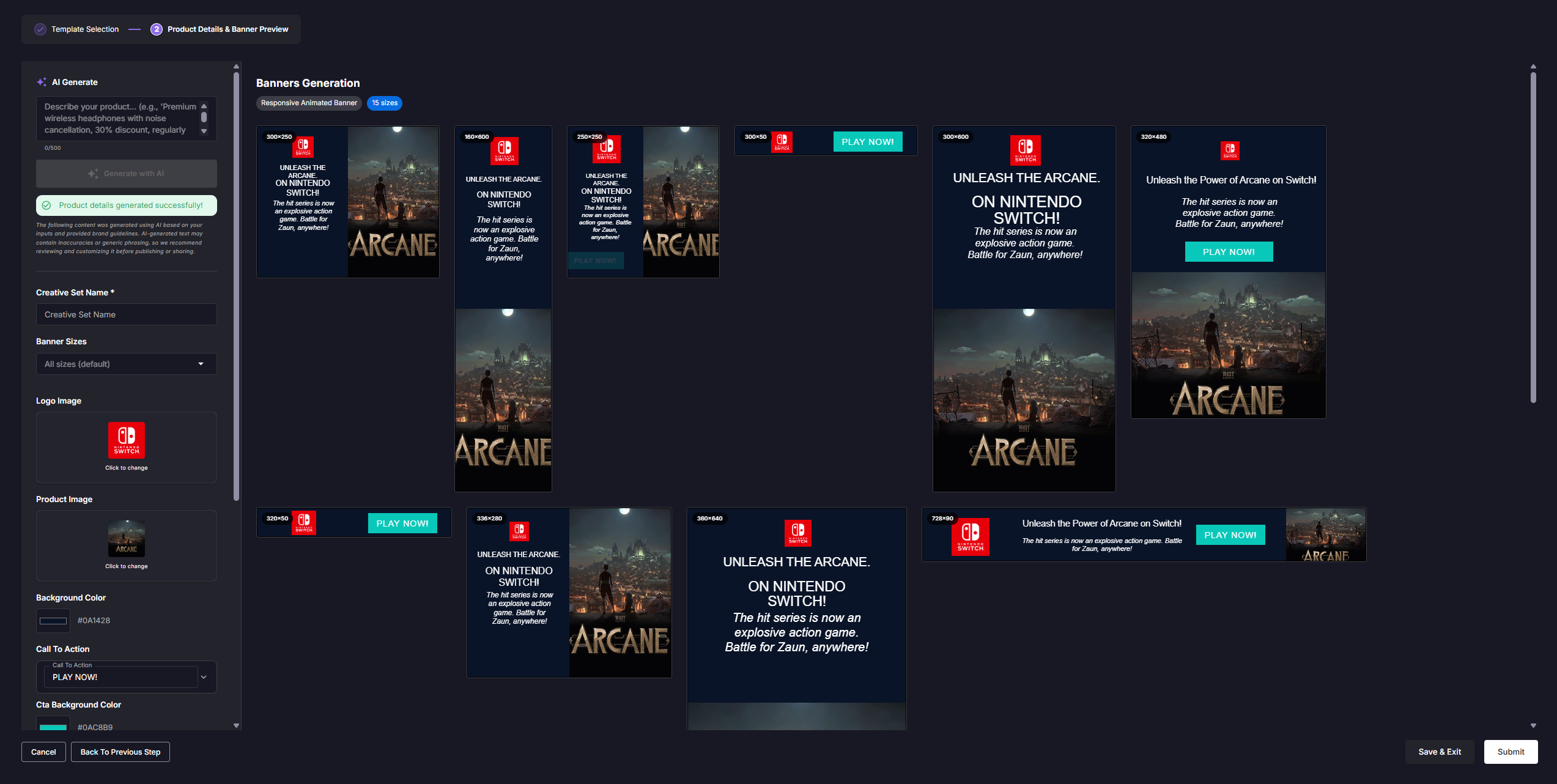
- Product Details & Live Preview — a dynamic form generated from the template's schema, rendered side-by-side with a live, multi-size preview grid. Every keystroke re-renders every size.
The wizard owns its own draft model so users can leave and resume mid-flow.
A Google Web Designer compatibility layer
The unlock was treating GWD as the template format rather than reinventing it.
- Maps each form field to a
%%KEY%%placeholder inside the template's HTML. - Recognises GWD's selector conventions and rewrites page background, per-element colors, CTA button colors, and text color through the same path.
- Sanitises every injected value at the boundary — strict hex / rgb(a) / named-color regex for colors, CSS-breakout stripping for raw values, HTML escaping for text, JS escaping for click-tag handlers. The one function that turns user input into rendered markup is also the one that locks down the OWASP-relevant injection vectors.
The same injector output feeds the wizard preview, the completed-set preview dialog, and the server-side build. No drift between what the user sees and what DV360 ships.
3D as a first-class template field
- 3D wasn't bolted on — I designed it in as one of the core asset types alongside image, logo, and icon. A template author drops a 3D model slot into a GWD banner with a placeholder; the wizard:
- Detects the field and gates the asset picker to 3D-compatible assets only.
- Lets the user pick a 3D scene preset (camera, lighting, behaviour) so the same model can produce different ad experiences without re-exporting from the 3D tool.
- Renders the resulting interactive ad live inside the preview grid, in every selected size, before anyone leaves the wizard.
- Pushes it to DV360 through the same one-click flow as a static banner.
This is the only place in the product where shipping a 3D creative is a no-code workflow rather than a bespoke delivery.
Live multi-size preview
The preview grid renders one sandboxed iframe per dimension, lazy-mounted via IntersectionObserver so a 30-size set doesn't melt the browser. Each iframe is fed the injector's output directly, so edits — text, color, image swap, 3D model swap, scene preset — reflect everywhere in real time without a server round-trip.
Bulk and assisted authoring
- CSV import — paste a brief, hydrate the dynamic form, fan out to every size.
- AI generate — generate copy and asset suggestions and drop them straight into the draft.
Both reuse the exact same injection and preview pipeline. One render path, multiple ways in.
One-click DV360 push
Completed sets expose a Push to DV360 action. The platform packages the HTML5 output for every size, ships it to DV360 as a creative set, and surfaces server-side errors back to the user. The draft carries the DV360 campaign association from creation, so the same set lands in the right place without re-keying anything.
This is the step that closes the loop — brief → preview → trafficking — inside one product.
Decisions worth calling out
- GWD as a partner, not a competitor. Deliberately not building a banner editor was the call that made the feature ship. The studio's tooling investment becomes the template library; the product owns the assembly line.
- One injector, every consumer. Wizard preview, completed-set preview, and production build all consume the same field-value contract.
- Security at the boundary. Sanitisation lives inside the one function that turns user input into markup, so a malformed brief cannot produce a malformed banner.
- Additional dimensions as data. A single master plus a list of dimensions replaces what used to be N near-identical GWD files.
- 3D as a field type, not a feature flag. Treating 3D models as just another asset type means every wizard, every preview, every DV360 push supports them for free.
Impact
- Banner sets that previously took days of designer + trafficker time can be produced and trafficked in minutes by a single non-designer.
- 3D / interactive formats moved from "bespoke project" to "checkbox on a template."
- Copy, color, and asset iteration no longer require touching Google Web Designer.
- A single one-click DV360 push replaced a manual zip-upload-and-link workflow.
Why 3D was worth designing in
Making 3D a first-class field type wasn't a vanity feature — interactive and 3D formats consistently outperform static display on the metrics buyers actually pay for. Industry benchmarks:
| Metric | Static / 2D display | Interactive / 3D creative |
|---|---|---|
| Average CTR (display) | ~0.05 – 0.10% | 0.5 – 1%+ (5–10× lift commonly reported across rich-media and 3D vendors) |
| Dwell / engagement time | seconds | ~3–5× longer on 3D vs. equivalent static |
| Purchase intent / brand lift | baseline | ~40–70% higher on shoppable 3D vs. static product imagery (Google, Shopify, Vntana studies) |
| Return rate (e-commerce, post-3D-view) | baseline | ~20–40% lower when a 3D / AR view is available before purchase |
| Ad recall on rich-media vs. static | baseline | ~2× higher (IAB / MRAID rich-media benchmarks) |
*Figures are widely cited industry benchmarks (IAB, Google, Shopify, Vntana, Cuttable, Threekit) and vary by vertical and placement — they're directional, not guaranteed lifts. The point is that interactive 3D consistently moves the needle, and historically the bottleneck was production cost, not media demand.*
The Banner Generator removes that production bottleneck: a 3D creative ships through the same wizard, in the same time, as a static one.
What's next
- Direct DV360 line-item attach so a pushed set is bound to its campaign without a second step.
- In-product template authoring — a thin GWD-export ingestion that recognises placeholders automatically, so the studio onboards new templates without engineering involvement.
- A/B variant fan-out — copy variants × 3D scene presets × sizes generated from a single brief and pushed as a DV360 creative-rotation group.